Custom Snapmaker U1 Firmware
Spoolman Integration
Automatic filament metadata sync and spool tracking via Spoolman.
Setting this up for the first time? See the NFC Tags & Spoolman Setup Guide.
What It Provides
- Resolves a Spoolman spool by ID or RFID card UID and applies its metadata (vendor, material, variant, colour) to the extruder channel.
- Associates RFID card UIDs with spools automatically, so scanning a known card loads its filament without any manual step.
- Tracks the active spool in Moonraker so Spoolman can update remaining filament weight as you print.
Screenshots
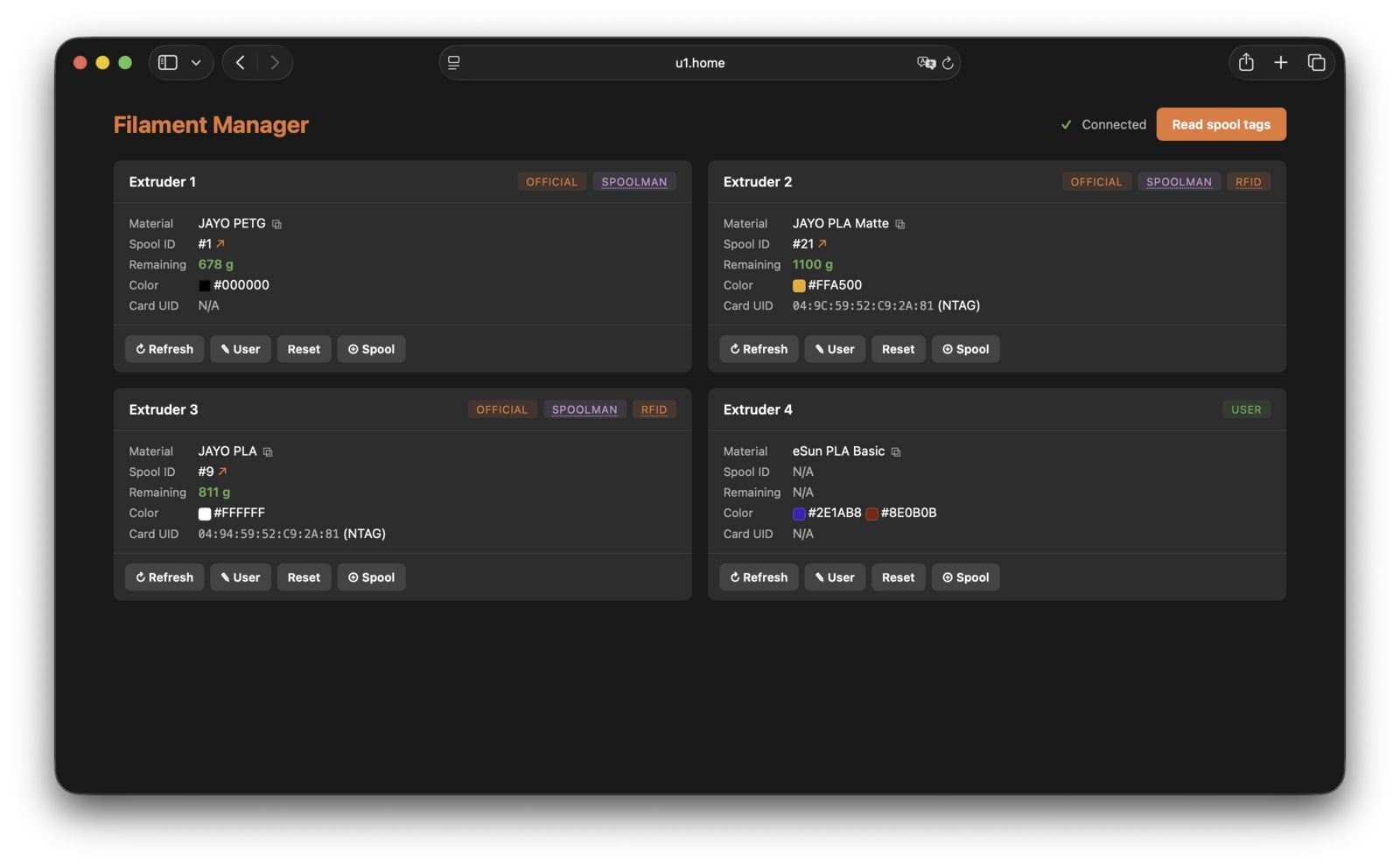
Filament Manager (/filament/) reconciles each channel across Official
tag data, User-set filament, the active Spoolman spool, and the raw RFID
tag:
Enabling
Enable in the firmware-config web interface under
Settings > Snapmaker Components > Spoolman Integration, and enter the Spoolman
URL including scheme and port (e.g. http://192.168.1.100:7912). Set the same
toggle to Disabled to turn it off.
Apps
Community apps that support SpoolLink, so scanning a tag resolves its spool automatically when the filament is loaded:
| App | Author | Platform | Reads | SpoolLink support | Legacy Spools | Source | Support the author |
|---|---|---|---|---|---|---|---|
| SpoolLink (Android) | paxx12 | Android (releases; or build from source) | OpenSpool; any tag by UID (NTAG, Mifare Classic) | Reference implementation — links tags to spools by UID, pre-fills from OpenSpool tags | ✅ (see notes) | GitHub (GPL-3.0) | — |
| SpoolLink (iOS) | paxx12 | iOS (releases IPA — sideload via AltStore or similar; building from source requires a paid Apple Developer account for the NFC entitlement) | OpenSpool; any tag by UID (NTAG only — no Mifare Classic on iOS) | Reference implementation — links tags to spools by UID, pre-fills from OpenSpool tags | ✅ (see notes) | GitHub (GPL-3.0) | — |
| SpoolPainter | ni4223 | Android (Google Play) | OpenSpool; Bambu Lab, Snapmaker, QIDI, Anycubic, Elegoo, Creality (vendor decode + prefill; Bambu Lab and Creality need a per-brand key); any tag by UID for pairing | Links tags to spools; create-and-pair spools, multi-tag binding, vendor tag pairing | ✅ (see notes) | GitHub (GPL-3.0) |     Snapmaker Referral Code: ni42 |
| SpoolKid | Marco | iOS (TestFlight beta; build from source) | OpenSpool, OpenTag3D, ELEGOO, Anycubic ACE; any other tag by UID (including Mifare Classic) | Links tag UIDs to spools, including UID-only linking for Mifare Classic and other tags it can’t otherwise read | – | GitHub (MIT) |  |
| SpoolTagger | NiftyBits | Windows, Linux (desktop, ACR122U USB NFC reader; releases) | OpenSpool (NTAG); Mifare Classic by UID only | Links tags to spools (up to 2 tags per spool) | ✅ (see notes) | Codeberg (MIT) |  |
| 3DMRP | MKloberg | Self-hosted (Windows; releases), phone via Chrome on Android | Any tag by UID (Web NFC scan-to-select; no content parsing) | Print-farm manager — links tags to spools, NFC scan-to-select; also AFC lane control and U1 touchscreen mirror | – (see notes) | GitHub (source) | |
| Spool Studio | GeorgHo | Android (v3.0.2 release) | OpenSpool; Bambu Lab (with user-provided key); legacy Spool Studio tags (for conversion); any tag by UID | Links tags to spools via NFC card UID; writes Paxx12-compatible OpenSpool tags and shows the printer-reported toolhead status | ✅ (see notes) | GitHub (MIT) | |
Notes:
- Legacy Spools means the app converts an older tag into a SpoolLink
link, so spools tagged before SpoolLink keep resolving:
- SpoolLink apps (Android and iOS) — a scanned tag carrying an
OpenSpool
spool_idis linked to that spool automatically. - SpoolPainter — a scanned tag carrying an OpenSpool
spool_idresolves its spool and offers to re-pair it. - SpoolTagger — migrates the whole Spoolman library in one pass on startup.
- 3DMRP — writes the current convention since v0.8.1; earlier links are updated on the next rescan.
- Spool Studio — v3 converts tags written by its own older (pre-SpoolLink) spool-id format after confirmation; v2 stable remains available for older firmware that predates SpoolLink.
- SpoolLink apps (Android and iOS) — a scanned tag carrying an
OpenSpool
- 3DMRP’s Android support is its Chrome-based mobile NFC client (Web NFC API); the print-farm server itself runs on Windows only.
- Apps that write filament data (material, colour, temperatures) to tags are listed in RFID Format & Reader Design.
External Readers
Community hardware readers push detected tags to the same
filament_detect/set webhook the printer’s built-in readers use. For a tag
to resolve a Spoolman spool by UID, the reader must report the UID for every
detected tag — even one it can’t otherwise read — the same way
OpenRFID falls back to a UID-only report
when a tag can’t be parsed:
| Project | Author | SpoolLink support | Source | Support the author |
|---|---|---|---|---|
| External - wasikuss: snapmaker-u1-remote-rfid-reader | wasikuss | Partial — only reports a tag when its payload validates as OpenSpool JSON; unreadable, blank, or vendor-format tags are never reported, so those spools can’t be resolved by UID | GitHub (MIT) | — |
| External - baze: snapmaker-u1-drybox-nfc-reader | baze | Full — reports the UID for every detected tag by default (“UID-only” mode); can optionally switch to a full-read mode that also sends OpenSpool metadata, but then skips tags that aren’t valid OpenSpool | GitLab (CC BY-NC 4.0) | — |
Hardware and setup details for both readers are in RFID Format & Reader Design.
GCode Commands
SET_SPOOL_ID
Assign a Spoolman spool to an extruder channel. Reads the channel’s RFID card UID, binds it to the spool (so a later scan resolves automatically), and applies the filament metadata to the channel:
SET_SPOOL_ID LANE=E0 SPOOL_ID=5
| Parameter | Default | Description |
|---|---|---|
LANE |
— | Lane name (e.g. E0); resolved through AFC-Lite when enabled, otherwise from the name itself |
CHANNEL |
— | Extruder channel index (0-3), used instead of LANE |
SPOOL_ID |
0 |
Spoolman spool ID; 0 clears the assignment |
The macro is provided by the Spoolman integration itself, so it is available whenever Spoolman is enabled, with or without AFC-Lite.
Known Conflicts
-
Leftover pre-SpoolLink Spoolman macros. If Spoolman was previously wired up by hand (e.g. a community
spoolman_multi_tool-style Klipper include withCHANGE_SPOOLand related macros) before switching to SpoolLink, that file conflicts with the integration and can leave Klipper failing to start with an error such as:[Errno 2] No such file or directory: '/printer_data/config/variables.cfg'Rename or remove the old include (e.g. add a
.baksuffix) before enabling Spoolman here. See #567 for a reported case and workaround.
Limitations
- Spoolman must be reachable from the printer over HTTP.
- Variant defaults to
Basicfor Snapmaker-branded filaments when not set in Spoolman; empty for all other vendors.
For the wire format, custom fields, and component flow see the
design notes. For AFC lane status that surfaces
spool_id see AFC-Lite.