Custom Snapmaker U1 Firmware
Chamber Heater
The Snapmaker U1 can drive an external chamber heater through Klipper, using the BIQU Panda Breath board with either of two firmwares:
- DragonBreath — recommended. Community open firmware flashed onto the Panda Breath board. Actively maintained, with an on-device safety model, and the path this firmware standardises on.
- Panda Breath. BIQU’s stock firmware, controlled over its WebSocket API.
Both are a 300 W PTC chamber heater with HEPA/carbon air filtration, and both are
presented to Klipper as a standard heater_generic, so slicer chamber temperature
commands (M141/M191) work out of the box. Only one can be enabled at a time.
If you already have a Panda Breath, there is a no-USB migration that converts it to DragonBreath over Wi-Fi.
Risks and Warranty
These apply to either chamber heater — they are a consequence of running a hot chamber on the U1, not of a particular device.
Warranty
Installing and operating a chamber heater significantly raises sustained operating temperatures inside the enclosure. This accelerates wear on electronics, motors, and other components beyond their rated conditions. Any damage attributable to elevated thermal stress is unlikely to be covered under warranty. Use at your own risk.
Motherboard Overheating
The U1 motherboard has insufficient thermal headroom for sustained elevated chamber temperatures. There are documented cases of motherboard overheating causing mid-print failures. The RK3562 main processor begins thermal throttling at 85 °C, degrading Klipper real-time performance and causing motion or communication errors.
Additional active cooling on the motherboard is required before using a chamber heater.
Printable cooling solutions available on MakerWorld:
- Snapmaker U1 MCU Mainboard Cooler Fan Holder — covers the full motherboard including the RK3562 main processor (recommended).
- Cooling of drivers on Snapmaker U1 (6015) — cools the stepper drivers only; does not cover the RK3562 main processor and is not sufficient on its own.
See also: Quick overview on fan mods applied for Snapmaker U1 — community thread covering additional fan mod approaches (to be evaluated).
DragonBreath
DragonBreath is community open firmware
for the Panda Breath board. It drives the same PTC heater and filtration blower, adds
an on-device safety model (sensor checks, target clamp, element foldback,
over-temperature shutdown, cooldown airflow, and a communications watchdog), and
integrates with Klipper as a heater_generic.
⚠️ Safety. DragonBreath drives a mains-powered heater and ships with no warranty. A fault could cause overheating, fire, or damage. Use at your own risk and never run it unattended. Additional motherboard cooling is required — see Risks and Warranty.
Prerequisites
- Install motherboard cooling — see Risks and Warranty.
- A Panda Breath board flashed with DragonBreath firmware and provisioned onto your network — see Device setup, or migrate an existing Panda Breath.
- A static DHCP lease for the DragonBreath device — Klipper connects to it by IP address on every print, so its IP must not change.
Enabling
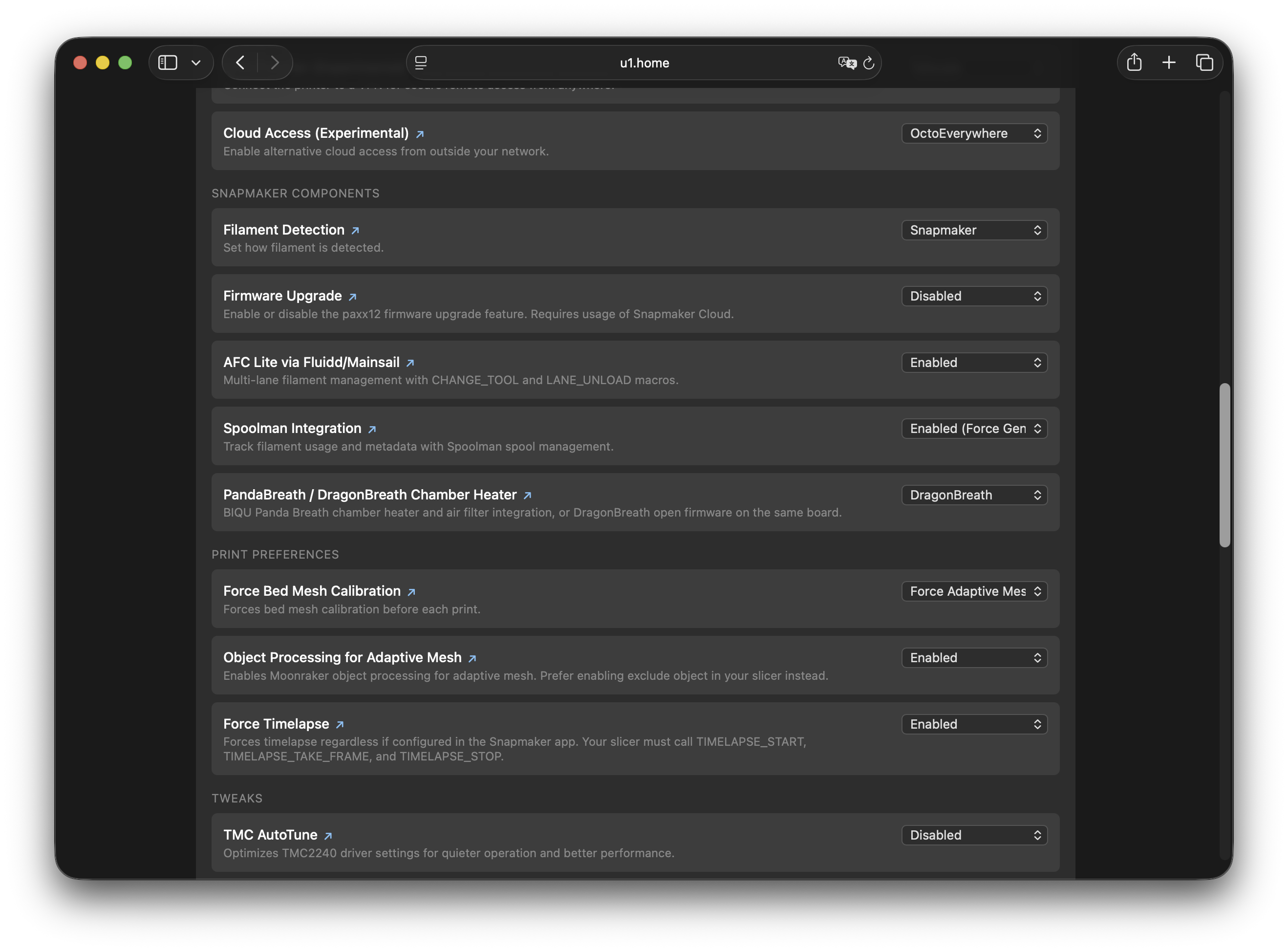
In the Firmware Config web interface at http://<printer-ip>/firmware-config/, open
Snapmaker Components → PandaBreath / DragonBreath Chamber Heater and choose
DragonBreath (Recommended).
You will be asked to:
- read and accept the warning by typing
I UNDERSTAND, and - enter the DragonBreath device’s IP address.
Enabling writes the Klipper configuration and restarts Klipper. It does not touch the device: DragonBreath holds its own connection to the printer (see Usage), so the device must already be flashed and provisioned.
If a Panda Breath is currently enabled, the two are mutually exclusive — set the setting to Disabled first, or use Migrate to DragonBreath.
Migrating from Panda Breath (no USB)
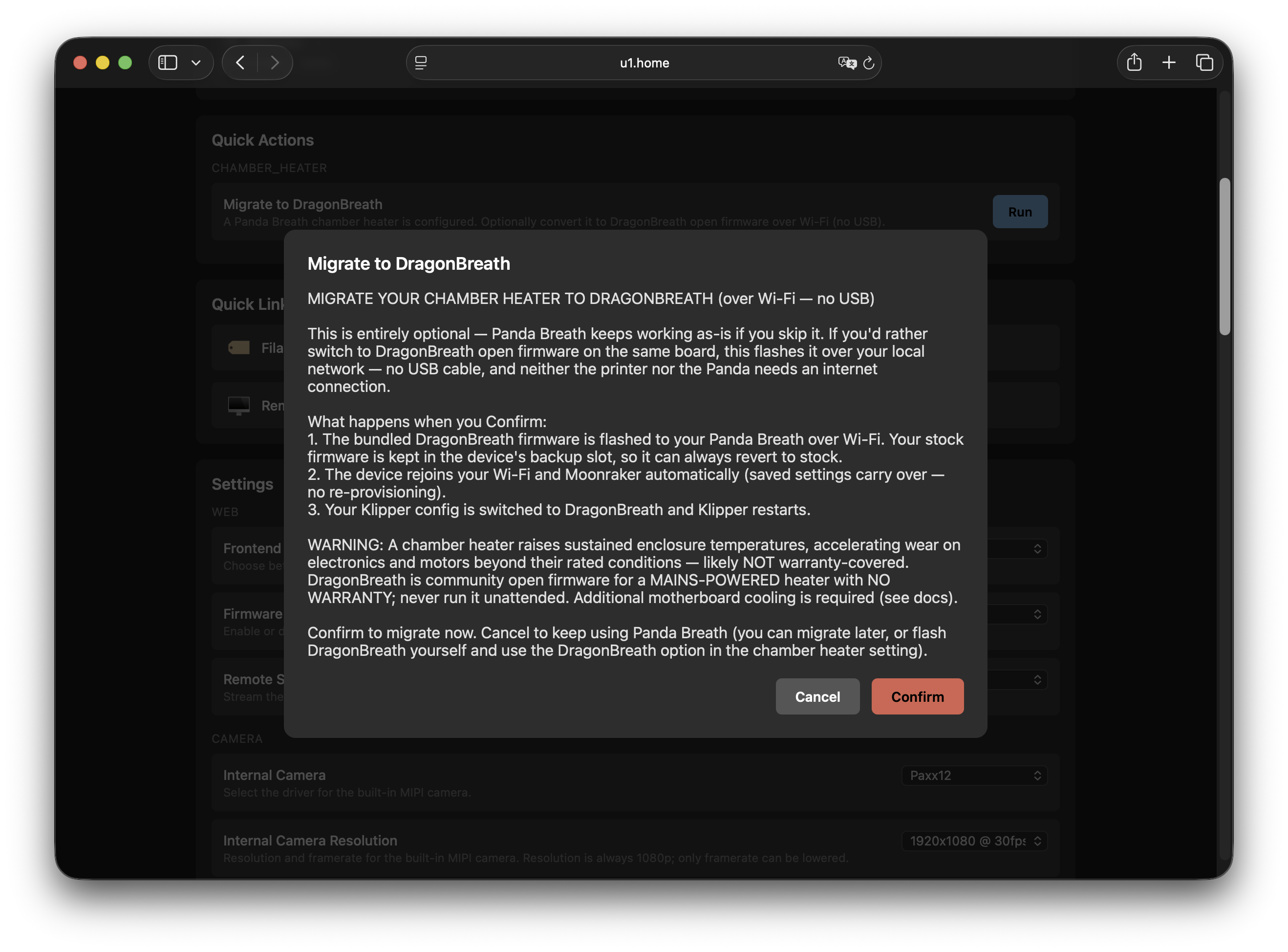
If a Panda Breath is already configured, Firmware Config offers a Migrate to DragonBreath action that converts it over Wi-Fi — no USB, no flashing by hand:
- It flashes the bundled DragonBreath firmware to the board’s inactive OTA slot and reboots into it. Stock firmware stays in the other slot, so the change is revertible.
- Wi-Fi and Moonraker settings are carried over from the stock configuration on first boot, so the device rejoins your network with no re-provisioning.
- The Panda binding is removed and the DragonBreath Klipper configuration is written in its place.
To revert, boot the device back to its stock slot: Settings → Maintenance → Boot inactive slot on the device (works until the next DragonBreath firmware update overwrites that slot).
Device setup
If you are not migrating, set the device up directly:
- Flash DragonBreath. In the stock Panda Breath web UI, open Firmware
Update and upload
dragonbreath-<version>.binfrom the DragonBreath releases. Stock writes it to the inactive slot and reboots into it. - Wi-Fi. DragonBreath carries your Wi-Fi credentials over from the stock
configuration on first boot. If it cannot join (for example the network changed),
it starts an access point
DragonBreath_XXXX(password987654321); connect to it and the setup page opens automatically, or browse tohttp://192.168.4.1. - Control source. On the device’s
/setuppage (also in the AP portal), set Control source to Klipper / Moonraker (the default) and enter your printer’s Moonraker host. This is a single choice — the other sources (Bambu, Home Assistant, Klipper-MQTT) are mutually exclusive. - Static DHCP. Reserve the device’s IP; Klipper connects to it by IP on every print.
For full device documentation, see the DragonBreath repository.
Configuration File
Enabling writes a connection config you own:
/home/lava/printer_data/config/extended/klipper/dragonbreath.cfg
Edit it in Fluidd/Mainsail or via SSH to change the IP or port, then restart Klipper:
[dragonbreath]
host: 192.168.1.100
#port: 80
#token: web
tokenis only needed if you set a control token on the device (stored in the device’s NVS); Klipper sends it as theX-DragonBreath-Authheader. Leave it commented unless you configured one.- The heater itself is defined in a firmware-managed file
(
dragonbreath_heater.cfg) that is included automatically. Do not edit it — it is overwritten on firmware upgrades. It caps the settable chamber target at 70 °C, a hard limit enforced by the DragonBreath firmware.
Usage
DragonBreath appears in Fluidd/Mainsail as a chamber heater
(heater_generic dragonbreath) plus a filtration toggle. Use standard G-code:
| Command | Effect |
|---|---|
M141 S45 |
Set chamber target to 45 °C |
M191 S45 |
Set chamber target to 45 °C and wait until reached |
M141 S0 |
Turn off chamber heating |
In your slicer, set the filament profile’s chamber temperature as usual — M141/M191
commands in start G-code are handled automatically. For start-macro recipes,
bed/chamber ordering, and the OrcaSlicer command-ordering trap, see
Using the chamber heater.
Filtration blower. The blower is a simple on/off output
(output_pin dragonbreath_filter) — drive it with
SET_PIN PIN=dragonbreath_filter VALUE=1 (on) / VALUE=0 (off). For safety, the
device refuses to switch it on while heating or cooling down; turning it off is
always allowed.
How control works. There is no separate auto/manual mode. Klipper pushes the target and keeps a heartbeat “lease” with the device; DragonBreath holds that target autonomously on its own controller and latches the heater off if Klipper stops or crashes (its communications watchdog). The chamber follows whatever your slicer/macros command, with the device providing the safety fallback.
Native command
| Command | Description |
|---|---|
DRAGONBREATH_RESET |
Clear a latched DragonBreath device fault |
Disabling
Set Snapmaker Components → PandaBreath / DragonBreath Chamber Heater → Disabled. The Klipper configuration is removed and Klipper restarts. This does not revert the device firmware — see Migrating from Panda Breath for how to boot the board back to stock.
Troubleshooting
Klipper shows a heater error / verify_heater failure. DragonBreath is a slow
heater with coarse 1 °C reporting; the managed configuration already uses relaxed
verify_heater windows. If it still trips, check Wi-Fi between the printer and the
device.
Device not reachable. Set a static DHCP lease and use the IP address in
dragonbreath.cfg; mDNS can be unreliable.
Heater latched off mid-print. The device drops the heater if the Klipper link goes
quiet (the communications watchdog). Check Wi-Fi stability, then clear a latched fault
with DRAGONBREATH_RESET.
Locked out / lost network. On the device, hold Power + Auto for 5 s to wipe its network and configuration and return to the setup access point. The firmware is untouched and the heater is cut.
Print fails or printer reboots during long high-temperature prints. This is a symptom of motherboard overheating. See Motherboard Overheating.
Panda Breath
Integrates the BIQU Panda Breath
running its stock firmware. This firmware reverse-engineers the Panda Breath
WebSocket API and exposes the device as a standard Klipper heater_generic, so slicer
chamber temperature commands (M141/M191) work out of the box.
If you are setting up a new device or want the maintained path, use DragonBreath instead.
Prerequisites
- Install motherboard cooling — see Risks and Warranty.
- Panda Breath device running firmware v1.0.3 or v1.0.4. (v1.0.4 only adds an optional Home Assistant MQTT interface; the WebSocket control path this integration uses is unchanged, so both versions work identically here.)
- Static DHCP leases for both the printer and the Panda Breath device on your router. The printer IP is embedded into the Panda Breath device during setup and must not change on reboot. Klipper connects to the Panda Breath by IP address on every print.
- Power-cycle the Panda Breath and wait at least 5 seconds before enabling.
Enabling
Enable via the Firmware Config web interface under Snapmaker Components → PandaBreath / DragonBreath Chamber Heater → Panda Breath.
During setup the web interface will ask for the Panda Breath IP address and will automatically bind the device to the printer.
Panda Auto mode heats the chamber to target under Klipper, then hands off hold and
cool-down to the Panda’s native auto mode (requires device firmware v1.0.3 or v1.0.4).
A legacy pure-heater_generic Manual mode also exists but is hidden — it is less
safe if the device or network is lost mid-print, and is not recommended.
Configuration File
After enabling, a config file is placed at:
/home/lava/printer_data/config/extended/klipper/panda_breath.cfg
To change the IP address or port, edit that file directly in Fluidd/Mainsail or via SSH:
[panda_breath]
host: 192.168.1.100
port: 80
Restart Klipper after saving.
Usage
Once enabled, the Panda Breath appears as a chamber heater in Fluidd/Mainsail. Use standard G-code commands to control it:
| Command | Effect |
|---|---|
M141 S45 |
Set chamber target to 45 °C |
M191 S45 |
Set chamber target to 45 °C and wait until reached |
M141 S0 |
Turn off chamber heating |
In your slicer, set the chamber temperature for the filament profile as usual —
M141/M191 commands in start G-code are handled automatically.
Native Commands
Additional commands are available for direct device control:
| Command | Parameters | Description |
|---|---|---|
PANDA_BREATH_AUTO |
ENABLE=1/0 TARGET=<°C> |
Enable/disable Panda native auto mode |
PANDA_BREATH_DRY_RUN |
TARGET=<°C> DURATION=<min> |
Start native filament drying cycle |
PANDA_BREATH_DRY_STOP |
— | Stop active drying cycle |
Disabling
Disable via Snapmaker Components → PandaBreath / DragonBreath Chamber Heater → Disabled. The device is automatically unbound from the printer and the configuration file is removed.
Troubleshooting
Klipper shows heater error / verify_heater failure
The Panda Breath is a slow external heater with coarse 1 °C temperature reporting. The
default verify_heater configuration uses extended gain check and error windows to
avoid false positives. If errors still occur, check WiFi connectivity between the
printer and the Panda Breath device.
Device not reachable at PandaBreath.local
mDNS resolution can be unreliable. Set a static DHCP lease and use the IP address
directly in panda_breath.cfg.
Print fails or printer reboots during long high-temperature prints
This is a symptom of motherboard overheating. See Motherboard Overheating for cooling solutions.
Related Documentation
- Firmware Configuration — enable the chamber heater via the web interface under Snapmaker Components
- Klipper and Moonraker Custom Includes — further customise the generated
dragonbreath.cfg/panda_breath.cfg - DragonBreath — device firmware, safety model, and setup
- Using the chamber heater — control workflows and slicer start-G-code guidance