Custom Snapmaker U1 Firmware
Camera Support
The extended firmware includes hardware-accelerated camera support with WebRTC streaming.
Features
- Hardware-accelerated camera stack (Rockchip MPP/VPU) with WebRTC streaming
- MIPI CSI internal camera and USB camera support
- Low-latency WebRTC streaming (best quality and performance)
- Hot-plug detection for USB cameras
- Configurable resolution/framerate presets (paxx12 service only)
- Web-based camera controls with settings persistence
- Optional RTSP streaming support
- Compatible with AI detection and Snapmaker Cloud features
Accessing Cameras
Internal Camera
Access at: http://<printer-ip>/webcam/
The internal camera is automatically configured and enabled.
USB Camera
Access at: http://<printer-ip>/webcam2/
USB cameras must be enabled first. See USB Camera Configuration below for setup instructions.
Camera Controls
Note: Camera controls and RTSP streaming are only available with the paxx12 camera service.
The paxx12 camera service includes a web-based interface for adjusting camera settings in real-time. Available controls depend on your camera hardware capabilities.
Accessing Camera Controls
Camera controls are accessible at:
- Internal camera:
http://<printer-ip>/webcam/control - USB camera:
http://<printer-ip>/webcam2/control
Settings Persistence
Camera settings are automatically saved across reboots:
- Internal camera:
/oem/printer_data/config/extended/camera/case.json - USB camera:
/oem/printer_data/config/extended/camera/usb.json
To reset camera settings to defaults, delete the corresponding JSON file and reboot the printer.
Configuration
Internal Camera Selection
By default, the extended firmware uses a custom hardware-accelerated camera service (paxx12).
Using firmware-config Web UI (preferred)
Navigate to the firmware-config web interface, go to the Camera section, and select your preferred internal camera service or disable it.
Manual Setup (advanced)
Step 1: Edit /home/lava/printer_data/config/extended/extended2.cfg.
To switch to Snapmaker’s original camera service:
[camera]
internal: snapmaker
To disable the internal camera entirely (also disables timelapses):
[camera]
internal: none
Step 2: (Optional) Customize streaming mode by editing /home/lava/printer_data/config/extended/moonraker/02_internal_camera.cfg:
[webcam case]
service: webrtc-camerastreamer
stream_url: /webcam/webrtc
snapshot_url: /webcam/snapshot.jpg
aspect_ratio: 16:9
Available streaming modes:
webrtc-camerastreamer- WebRTC streaming (best quality and performance, default)stream_url: /webcam/webrtc
iframe- H264/MJPEG iframe streaming (acceptable quality and performance)stream_url: /webcam/player
mjpegstreamer-adaptive- MJPEG streaming (best compatibility, most resource intensive)- No stream_url needed (uses snapshot_url only)
Step 3: Reboot the printer for changes to take effect.
Note: Only one camera service and one streaming mode can be operational at a time for the internal camera.
USB Camera Configuration
USB camera support is disabled by default (paxx12 service only).
Using firmware-config Web UI (preferred)
Navigate to the firmware-config web interface, go to the Camera section, and enable USB camera support. This will automatically configure both the camera service and Moonraker streaming settings.
Manual Setup (advanced)
Step 1: Edit /home/lava/printer_data/config/extended/extended2.cfg to enable USB camera:
[camera]
usb: paxx12
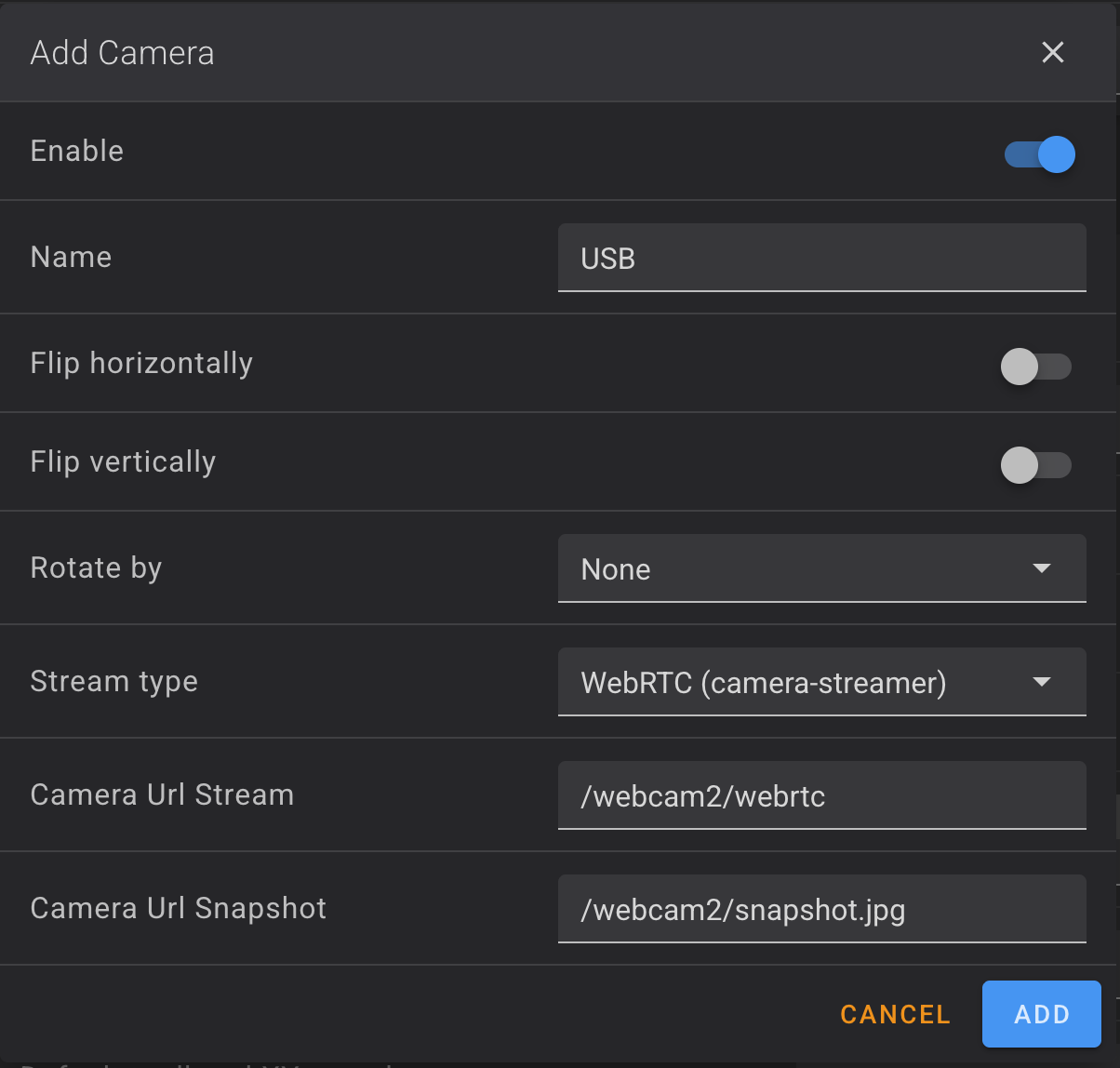
Step 2: Edit /home/lava/printer_data/config/extended/moonraker/03_usb_camera.cfg to configure USB camera streaming:
[webcam usb]
service: webrtc-camerastreamer
stream_url: /webcam2/webrtc
snapshot_url: /webcam2/snapshot.jpg
aspect_ratio: 16:9
Available streaming modes:
webrtc-camerastreamer- WebRTC streaming (best quality and performance, default)stream_url: /webcam2/webrtc
iframe- H264/MJPEG iframe streaming (acceptable quality and performance)stream_url: /webcam2/player
mjpegstreamer-adaptive- MJPEG streaming (best compatibility, most resource intensive)- No stream_url needed (uses snapshot_url only)
Step 3: Reboot the printer for changes to take effect.
To disable USB camera, set usb: none in extended2.cfg.
When enabled, USB cameras are accessible at http://<printer-ip>/webcam2/.
Note: Only one streaming mode can be active per camera.
Resolution & Framerate
Available for the paxx12 camera service only.
The internal camera is fixed at 1080p (required for AI detection); only framerate can be lowered. The USB camera can be lowered in both resolution and framerate to reduce bandwidth/CPU usage.
Using firmware-config Web UI (preferred)
Navigate to the firmware-config web interface, go to the Camera section, and select Internal Camera Resolution and/or USB Camera Resolution. These options only appear once the corresponding camera is set to the paxx12 service.
Manual Setup (advanced)
Step 1: Edit /home/lava/printer_data/config/extended/extended2.cfg:
[camera]
internal_resolution: 1080p25
usb_resolution: 720p25
Internal camera options: 1080p30, 1080p25 (default), 1080p15, 1080p5.
USB camera options: 1080p30, 1080p25 (default), 1080p5, 720p30, 720p25, 720p5, 360p30, 360p25, 360p5.
Step 2: Restart the relevant camera service (S99v4l2-mpp-mipi or S99v4l2-mpp-usb) or reboot the printer for changes to take effect.
RTSP Streaming
RTSP streaming is disabled by default (paxx12 service only).
Using firmware-config Web UI (preferred)
Navigate to the firmware-config web interface, go to the Camera section, and enable RTSP streaming.
Manual Setup (advanced)
Step 1: Edit /home/lava/printer_data/config/extended/extended2.cfg to enable RTSP:
[camera]
rtsp: true
Step 2: Reboot the printer for changes to take effect.
RTSP streams will be available at:
- Internal camera:
rtsp://<printer-ip>:8554/stream - USB camera:
rtsp://<printer-ip>:8555/stream
Camera Logging
Step 1: Edit /home/lava/printer_data/config/extended/extended2.cfg to enable logging:
[camera]
logs: syslog
Step 2: Reboot the printer for changes to take effect.
Logs are available in /var/log/messages.
Timelapse Support
Fluidd timelapse plugin is included (no settings support).